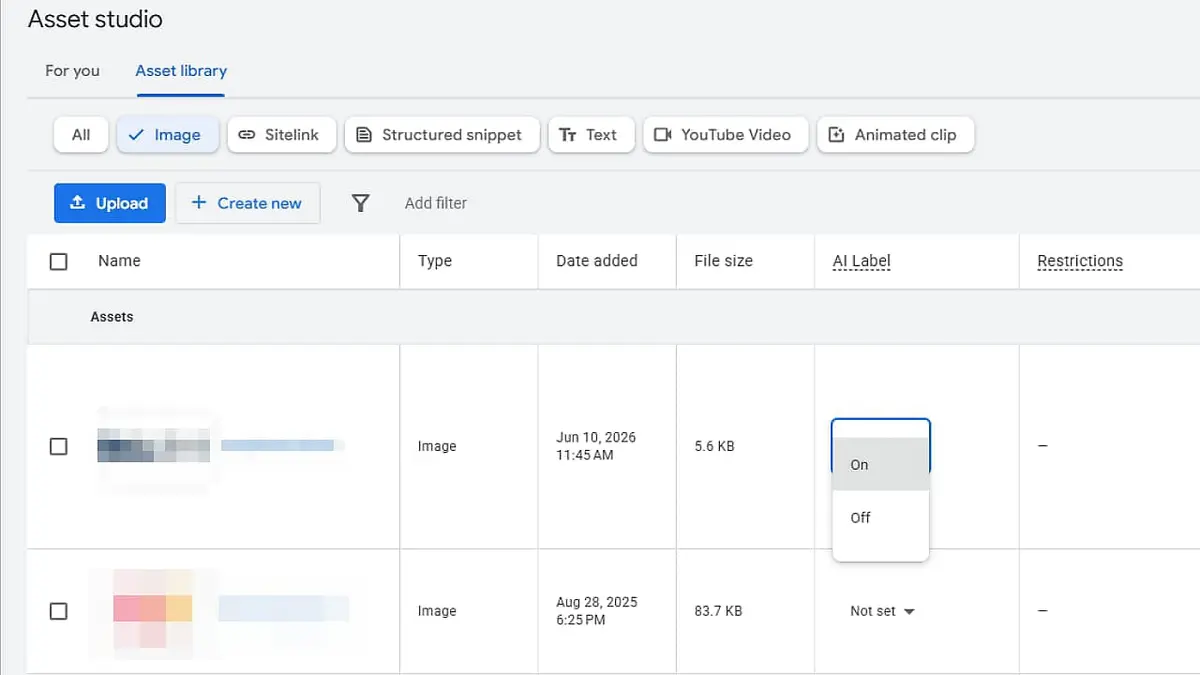
Google is rolling out AI content labels within asset studio, giving advertisers a new way to disclose when image and video assets have been generated or modified using AI.
The update is designed to help advertisers comply with emerging AI transparency regulations in markets including the European Union, India and New York.
What's new
Advertisers can now add text or visual AI labels directly to eligible image and video creatives, or enable a new AI label setting within Google's advertising platforms.
The setting is rolling out gradually across:
| Platform |
|---|
| Google Ads |
| Display & Video 360 |
| Campaign Manager 360 |
| Merchant Center |
| Google Ads Editor |
Google said it may also automatically apply labels to certain assets created with its own AI tools. These labels won't violate existing policies that prohibit text overlays or watermarks on ad creatives.
PPC specialist Hana Kobzova has already spotted the rollout across Google Ads, Merchant Center and Ads Editor. In affected accounts, a new AI Label column indicates whether labelling has been enabled. Ads using labelled assets display an AI disclosure icon wherever they appear.
Google noted that using the AI label setting alone does not guarantee compliance with local regulations and advised advertisers to seek legal guidance where necessary.
Why we care
As governments introduce rules requiring greater transparency around AI-generated content, advertisers will increasingly need a scalable way to disclose when AI has been used in their creative.
Google's built-in labelling tools simplify that process by integrating disclosures directly into campaign workflows, reducing the need for manual creative edits while helping advertisers prepare for evolving compliance requirements.
"How this ad was made"
This update comes alongside Google's announcement that it would start expanding AI transparency in ads.
By clicking "How this ad was made," a user can see whether an ad was created or edited with AI.
Bottom line
Google is making AI content disclosures a native part of its advertising ecosystem, giving advertisers new tools to label AI-generated creatives while helping them navigate a growing patchwork of AI transparency regulations.
Practical takeaways
Separate "label enabled" from "compliant." Google warns about this explicitly: the AI label setting is a tool, not proof of compliance. Jurisdiction-specific requirements must be checked separately.
Add the AI Label column to account review. A new column indicating whether labelling is enabled now exists — without looking at it, you don't know which assets are labelled.
Confirm the scope of automatic application. Google may auto-apply labels to assets created with its own AI tools, which also means labels can appear that you did not choose.
Tell the team it doesn't conflict with overlay policy. These labels are an exception to the prohibition on text overlays and watermarks — creative teams unaware of this may resist them.
Check all five platforms. The rollout spans Google Ads, DV360, Campaign Manager 360, Merchant Center and Ads Editor. Configuring one leaves gaps in the others.
Secure a bulk path. With hundreds of assets, one-by-one UI work is impossible — the Editor's User Attestation field appears in Google Ads Editor 2.13 and the SDF equivalent in DV360 Structured Data Files v10.1.
Read it with the growth of AI-generated elements. AI-written text appearing outside advertiser control is covered in Google Tests AI-Generated Descriptions in Shopping Ads. Rules about disclosing who made something are expanding at the same time as the platform generates more of it itself.