Google has been hinting at the demise of standalone Dynamic Search Ads (DSA) campaigns. At first Performance Max seemed likely to replace DSA. However, as AI Max gained traction, Google's final URL expansion across Search emerged as the nail in DSA's coffin.
The timeline changed
We were initially told Google would automatically migrate all DSA campaigns to AI Max in September. After considering advertiser feedback:
| Item | Date |
|---|
| DSA campaigns can still be created until | January 2027 |
| Automatic migration begins | February 2027 |
What DSA did for you
DSA is a lifesaver for accounts with little non-brand search term data. It also does a fantastic job of breaking the site into manageable chunks.
When I'm setting a dynamic ad target, I can see how Google has categorized the site and how much of it falls into each category. This helps me determine how to organize non-brand search.
DSA search term performance has historically helped determine which keywords to focus on.
How AI Max is different
Core targeting signals
In standalone DSA, the website is the foundational targeting signal. In AI Max, the website is just one of many — alongside existing keywords, ad copy, budget and real-time user intent signals.
Campaign architecture
Standalone DSA is a separate campaign type or ad group structure sitting parallel to keyword campaigns, whereas AI Max for Search is another layer on your existing Search campaign structure.
Creative asset generation
With standalone DSA, Google dynamically generates a headline and display URL from text it crawls, while the advertiser provides static description lines.
AI Max for Search uses text customization, pulling from website copy, existing ad assets and the context of the search query to write custom headlines and descriptions.
Traffic redirection
DSA campaigns are bound by specific dynamic ad targets. AI Max leverages final URL expansion, so it can dynamically route a user to any relevant page across your entire domain while taking URL exclusions into account.
Steering guardrails
DSA controls include negative keywords and URL exclusions. AI Max has advanced features such as brand inclusion and exclusion lists at the ad group level, geographic intent targeting, and text guidelines.
What should you do?
If you're running DSA campaigns, you have time. However, the author recommends migrating before the deadline so you have control over the migration and post-migration period.
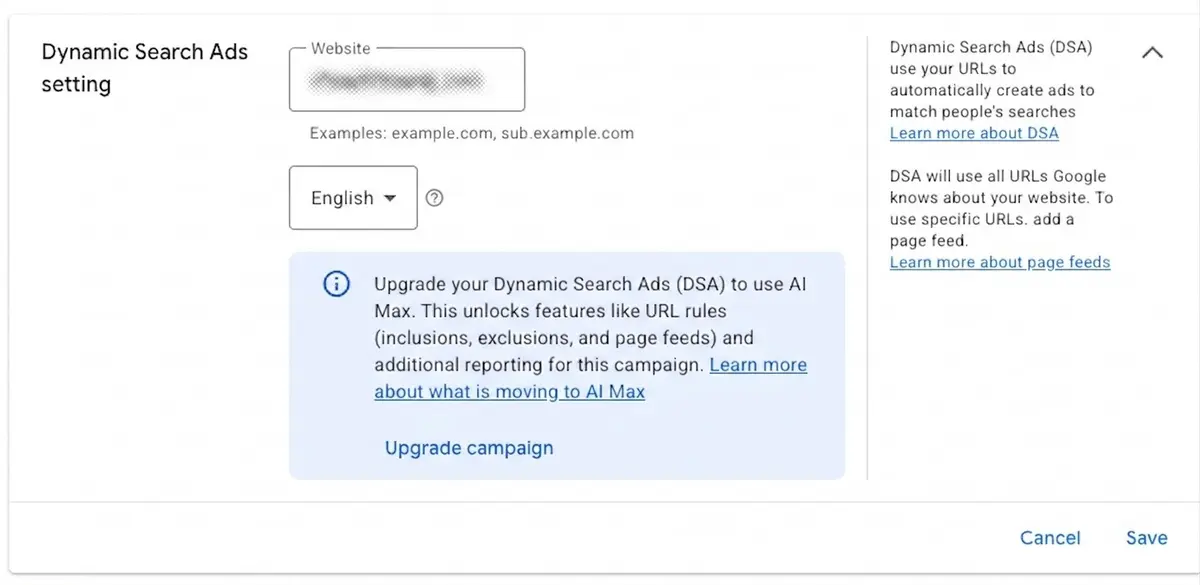
In your DSA campaign settings you'll find the option to manually upgrade within the Dynamic Search Ads setting. After clicking Upgrade campaign, another pop-up appears.
Once you upgrade, your campaigns will behave very differently from the original DSA campaigns.
1. Review AI-generated ads and brand controls
Check your automatically created responsive search ads to ensure they follow brand guidelines.
AI Max offers Text Guidelines — or Guardrails — for this purpose.
These brand safety controls allow you to specify up to 25 search term exclusions and 40 messaging restrictions that Google will consider when automatically creating your ads using text customization.
Review the assets Google creates by going to Ads > Assets > Performance. Make sure you have the "Added by" column selected so you can see which assets were added by Google AI.
2. Monitor your search terms
DSA matches ads based on website crawling, while AI Max reads your website and factors in additional user intent signals.
AI Max also expands narrower keyword match types using broad match and keywordless technology. This can make you eligible to serve for more searches, but it also increases the chances of your ads appearing for irrelevant content.
3. Watch where final URL expansion sends traffic
If you have final URL expansion enabled, closely watch which landing pages your ads are directed to.
DSA restricts traffic to your existing dynamic ad targets, while final URL expansion can route users to any relevant landing page on your domain if it predicts a higher conversion likelihood.
Use URL exclusion lists and brand controls to keep the AI in check.
Take control of the migration
If you're running DSA, you've got some breathing room before the mandatory migration, but don't wait for the deadline. Migrating early puts you in control rather than leaving the shift to Google's automation.
As Google expands its use of AI automation, paid search is becoming less about pushing buttons and more about guiding the technology toward your goals.
Google's algorithms excel at finding patterns, but they lack the context of your commercial goals, inventory challenges, and brand voice. The role is evolving from campaign operator to business translator.
Practical takeaways
A later deadline is not a reason to defer. January 2027 for creation, February 2027 for automatic migration buys time, but the recommendation is clear: being migrated and migrating are different things.
Export DSA category data before you move. The "how Google has categorized our site" view does not survive in the same form in AI Max — it is source material for non-brand structure.
Write the 25+40 text guidelines in advance. 25 search term exclusions and 40 messaging restrictions are the caps; filling them after clicking upgrade means ads are already live. See Testing Google Ads AI Max's Automated Ad Copy for how to build them.
Add the "Added by" column to your default view. Without it, AI-added assets are invisible and review is impossible.
Don't open final URL expansion on day one. DSA was bound to targets; AI Max can send traffic anywhere on the domain. Populate the exclusion list first.
Tighten the search term review cadence. Broad match and keywordless expansion raise irrelevant-query exposure — background in Google Says AI Max Unlocked Billions of New Monetizable Searches.
Do it in bulk from Editor — see Google Ads Editor 2.13.