Managing a Google Business Profile effectively requires looking beyond the dashboard you see today. A listing's address history can be critical for diagnosing hidden algorithmic penalties, protecting local rankings, and ensuring long-term search stability.
This context matters most for service-area businesses (SABs), where address visibility affects strategy directly.
Should you show the address?
Because Google is not always transparent about its guidelines, the local SEO community has tested and documented best practices around address updates. And the issue divides even seasoned local SEOs.
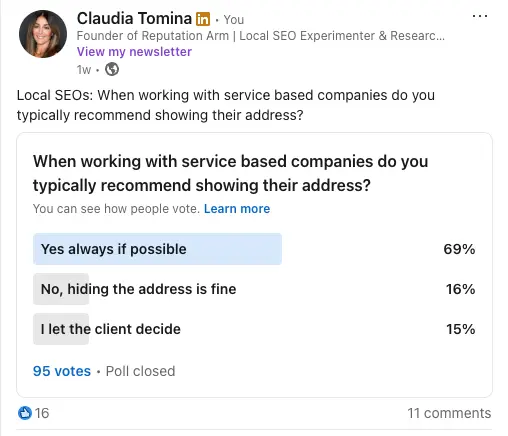
An industry poll the original author ran on LinkedIn found 69% advocate for showing the address whenever possible.
That percentage makes sense. Showing an address signals legitimacy, supports map pack visibility, and gives Google a geocodable anchor for your listing.
Your listing is haunted by its past
What makes address decisions complicated for SABs is not just the listing's current state. It is the full history behind it.
Before touching anything, three questions are worth asking:
- Was the address used to originally create the profile accurate enough to get properly anchored to a rooftop — meaning Google could resolve it to a precise building coordinate rather than a vague area point?
- Has the address ever been shown, then hidden — whether after a move or as a policy decision?
- Has the address been updated in the past?
Most practitioners assume Google simply updates its records when an address changes, and the listing starts ranking from the new location after verification. That assumption does not always hold for hidden-address SABs.
Your address and your map pin are not the same thing
The address stored in a Google Business Profile and the map pin Google uses for proximity calculations are two separate things.
When you enter an address in GBP, Google's geocoding engine reads that text string, cross-references it against its internal geographic database, and assigns a physical coordinate to your listing.
That coordinate — not the address text you typed — is what anchors your local rankings.
What hiding the address does
The author's testing indicates that when an SAB hides its address in the GBP dashboard, the map pin can revert to the original address the profile was created with.
So if the listing was created using a home address, P.O. box, or virtual office, your ranking anchor is likely still sitting at that original location, regardless of any address updates made since.
If your address is hidden, updating your address in the dashboard does not re-anchor your coordinates. Untoggling the hidden address, updating to a new location, and completing verification still does not move your functional map pin.
How widespread the misconception is
Despite that technical reality, there is still widespread confusion in the industry.
In a separate LinkedIn poll asking whether an address change for an SAB recenters local search rankings:
- 36% incorrectly believed rankings update to the new location
- 32% correctly understood that rankings do not move
- The remaining third were either unsure or thought it depended on the industry
Narrow the sample to specialists and the picture changes. The author surveyed Google Business Profile Product Experts and members of The SEO Slack community.
| Survey group | Rankings move to new location | Rankings stay tethered to original | Unsure / It depends |
|---|
| LinkedIn audience (62) | 35% | 34% | 31% |
| Specialised SEO group (16) | 18.8% | 62.5% | 18.7% |
The numbers draw a sharp line between general industry perception and specialised technical execution. On LinkedIn opinion split nearly down the middle; in the specialist group 62.5% correctly understood rankings stay tethered to the original.
The data highlights a dangerous misconception: many practitioners are making critical address updates under the false assumption that Google will automatically shift their local visibility to match.
Find your scenario before you touch anything
The right move depends entirely on what you are working with. Start by locating your situation.
Address hidden, never touched
Leave it alone if it is ranking well. The map pin is anchored to whatever address the profile was originally created with, and updating the address field will not move that anchor while it stays hidden.
To verify where the functional pin actually sits, run a grid ranking report before assuming anything.
Address hidden, listing inherited
Ask the client three things first:
- The exact original address
- Whether the address has ever been toggled between shown and hidden
- Whether the business has physically relocated since verification
If they do not know, triangulate with a grid ranking tool and narrow it down with a zoomed-in Google Maps search for their service category.
Address hidden, originally a P.O. box or virtual office
If the listing is not suspended, the practitioner panel splits here.
- Some leave it alone and treat any future update as a suspension risk to flag for the client
- Others get the client into a compliant physical address and align citations before touching the dashboard
Neither is wrong — but pick one deliberately rather than defaulting to whichever feels easier.
Visible address, moving within the same general area
A visible address update should move your map pin to the new location. Standard reverification may apply.
Visible address, moving across state lines
Update every other citation first — website, Facebook, Yelp, Apple Maps, schema, BBB and business documents — so the rest of the web already agrees on the new address before you touch GBP.
Keep the existing profile rather than starting fresh, since it retains your reviews and history.
Moving across state lines with historical navigational data at stake
This is the scenario where starting fresh instead of editing has the strongest case.
Years of directions requests and behavioural data tied to the old state can conflict with a newly edited address. And if the edited profile gets suspended, reinstatement often requires hiding the address — which reanchors the pin right back to the old location.
Weigh that risk against the review loss of starting over.
Creating a brand-new listing, hidden or visible
Run the exact address text through Google's Geocoding API before you submit anything. Confirm it resolves to ROOFTOP, not a partial match.
A wrong suffix or a suite number in the wrong field is often the difference between a precise pin and a listing anchored to a random patch of grass down the street.
The Kansas Bug and the ocean pin
Hiding an address can break a listing in ways that have nothing to do with historical anchors.
The Kansas Bug
The Kansas Bug drops SAB pins near Independence, Kansas — the geographic centre of the contiguous U.S. — regardless of where the business actually operates.
Jason Brown traced it to Google nulling the address in the backend when an SAB clears the field, even though the address is still stored internally.
The bug was not limited to U.S. businesses. It affects SABs in Australia, Canada, Ireland and the U.K., suggesting a universal bug.
The ocean pin
Darren Shaw documented a related but different case.
A client's pin landed in the ocean after she cleared her address and set her service area to the entire U.S., including Hawaii — pulling the calculated centre point into the Pacific.
Her original and current addresses were identical, so this was not a reversion. Restoring the address fixed it the next day, with no reverification needed.
"I know without a doubt that the address she used to verify is the same as the one that was on the profile, so it's not a case of the rankings just moving back to the old address." — Darren Shaw
The author notes having seen pins default to a service-area centroid before but never confirming it on a second profile, treating it as a plausible hypothesis, not a confirmed pattern.
Joy Hawkins has also documented ranking drops when a pin falls outside a business's service area.
Managing an SAB listing you inherited
When you inherit an SAB listing, you often have no visibility into how the profile was created, what address was used at setup, or whether that address was eligible under Google's guidelines.
The same problem applies when a business has moved or wants to transition from a visible storefront to a hidden-address SAB.
The three questions to ask:
- Do you know the exact physical address your GBP was originally created with?
- Has the business address ever been changed or toggled between shown and hidden on this profile?
- Have you relocated the physical operation of the business since the listing was first verified?
The answers — or the inability to answer — often explain frustrations that have gone undiagnosed for months or years: limited map pack visibility, a sudden drop in calls, or low engagement with no obvious cause.
Address history is rarely the first thing an SEO looks at, but in many inherited listings it is the one underlying factor that explains everything else.
Small address details change your map pin
The author illustrates with his own business address: 555 Friendly Rd., Pontiac, MI 48341.
He had long assumed the suffix was "Street" rather than "Road." Here is how Google's Geocoding API handles that tiny distinction:
- Querying with "St." throws a partial_match flag. Unable to find an exact match for that text string, the engine loses precision and drops the pin nearby on an open patch of green grass.
- Querying with "Rd." resolves the string with perfect confidence, producing a ROOFTOP location type that centres the pin precisely on the building's roof.
How confident are you that your client entered their address with 100% precision when they first created their profile years ago?
Adding suite numbers in address line one will also almost always cause a pin placement issue.
Run new listings through the Geocoding API first
Before creating any new listing — visible address or hidden — the author always runs the location through the Google Maps Geocoding API to see how the text string is read:
- Does "Road" need to be "Rd."?
- Should "County" be abbreviated?
- Is the suffix actually "Street" versus "Avenue"?
It is our job to make sure the address a client provides is clean enough to geocode to a precise rooftop, not a vague, middle-of-the-road dead end.
The tool is useful for two other things:
- Reverse geocoding: a lifesaver for international brands where local address formats are hard to parse. Ask the client for their exact latitude and longitude, then reverse geocode that into the clean text string Google expects.
- Duplicate detection: running the check shows what other business entities Google already associates with that exact address, flagging potential filtration issues or duplicates.
Do not trust your clients. Trust the ranking report.
Most business owners are not thinking about geocoding precision when they set up a profile. They type an address, click through setup, and assume Google figured it out.
But if you cannot get a listing to rank in the area where your client claims the business was originally established, stop guessing.
Run a proximity-based grid ranking report. If local visibility is blooming around a completely different neighbourhood miles away, there is a very high probability the profile was geocoded improperly or anchored to an old address from day one.
When it comes to local SEO history, memories fade, but the ranking data never lies.
Can reviews transfer between profiles?
The biggest hesitation when deciding to start fresh rather than edit a legacy address is fear of losing hard-earned customer reviews.
The short answer is yes — but it requires navigating Google's manual support channels.
Google allows review migration under specific circumstances, typically legitimate relocation or corporate restructuring. To maximise the chance of success:
- Keep both profiles open: both the source and target profile must be active in your dashboard for support agents to process the migration.
- Match the core brand signals: Google's manual support team evaluates business continuity. Business name, primary category and branding must remain consistent to prove it is the same operational entity.
- Submit official evidence: provide matching documentation such as updated business licenses or utility bills showing the transition from old address to new.
If support channels do not produce results, the Google Business Profile forum is the next stop.
A working checklist
Investigate the history before you migrate. If a move or address change is planned, first establish what address created the listing and what changes it has been through. Far cheaper than diagnosing why rankings never followed the move.
Choose the registration address deliberately. Registering a new SAB with a temporary home address is common. But if that address can persist as the long-term ranking anchor, it is not temporary.
Put the Geocoding API into your setup process. The difference between "Rd." and "St." moves the pin between a building roof and an empty lawn. It is nearly free to check.
Measure with grid ranking. What matters is where the pin actually sits, not what the client remembers.
Align it with your location page architecture. A GBP anchor conflicting with your website's geographic structure fragments the signal — see Multi-Location SEO: Why a Page per Geographic Keyword Is the Wrong Model.
Account for local data flowing into AI answers. A mis-anchored location feeds AI-generated local recommendations too — see ChatGPT Gains Yelp Reviews.
What you don't know about your profile's past can damage its future.