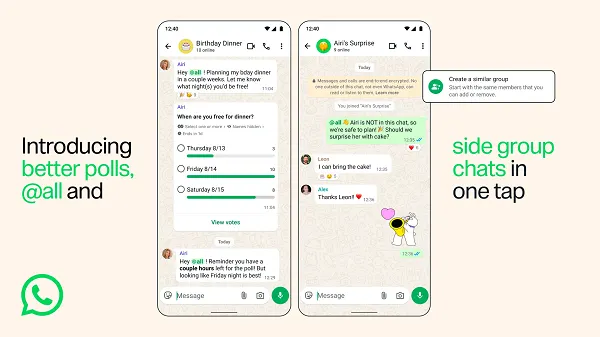
WhatsApp announced group chat updates including new poll options, an improved group creation process and announcements that alert all members — worth a look for teams running messaging-based community programs.
Polls get more control
Three additions to group polls:
- Set a time limit for poll voting
- Hide voter names from poll responses
- Edit poll questions within 15 minutes of posting
Polls have been available in group chats for some time, but these refinements add ways to encourage direct response. Hidden voter names in particular change response behavior on questions where candor matters.
The @all alert
A new @all option notifies all group members of important or time-sensitive messages.
"No more tagging people one by one or hoping your message gets noticed in a busy group chat," WhatsApp said. "Use @all to notify everyone about urgent messages, like school or office closures, event deadlines, or last-minute changes to your plans."
Its usefulness depends on whether members agree on what qualifies as critical. For groups with more than 32 people, @all is available only to group admins, and individual members can mute @all notifications.
One-tap side chats
Starting a group side-chat is now a single tap. "It's perfect for splitting off into a side conversation to plan a surprise party, coordinate event logistics, or dive deeper into a topic without cluttering the main chat," WhatsApp said — with the predictable side effect of more awkward discoveries that side chats exist.
For community managers
Three practical notes for brands running customer or community groups on WhatsApp.
Admin-restricted @all above 32 members means announcement rights can be controlled structurally, so a single group can carry both announcements and conversation without splitting channels.
Anonymous polls make a usable feedback instrument, surfacing criticism that named responses suppress.
Side chats pull substantive discussion out of the main group, raising the odds a community manager misses it — so set an operating rule that decisions get closed in the main channel.
For designing brand presence platform by platform, see Five Steps for Brand Presence on Threads.