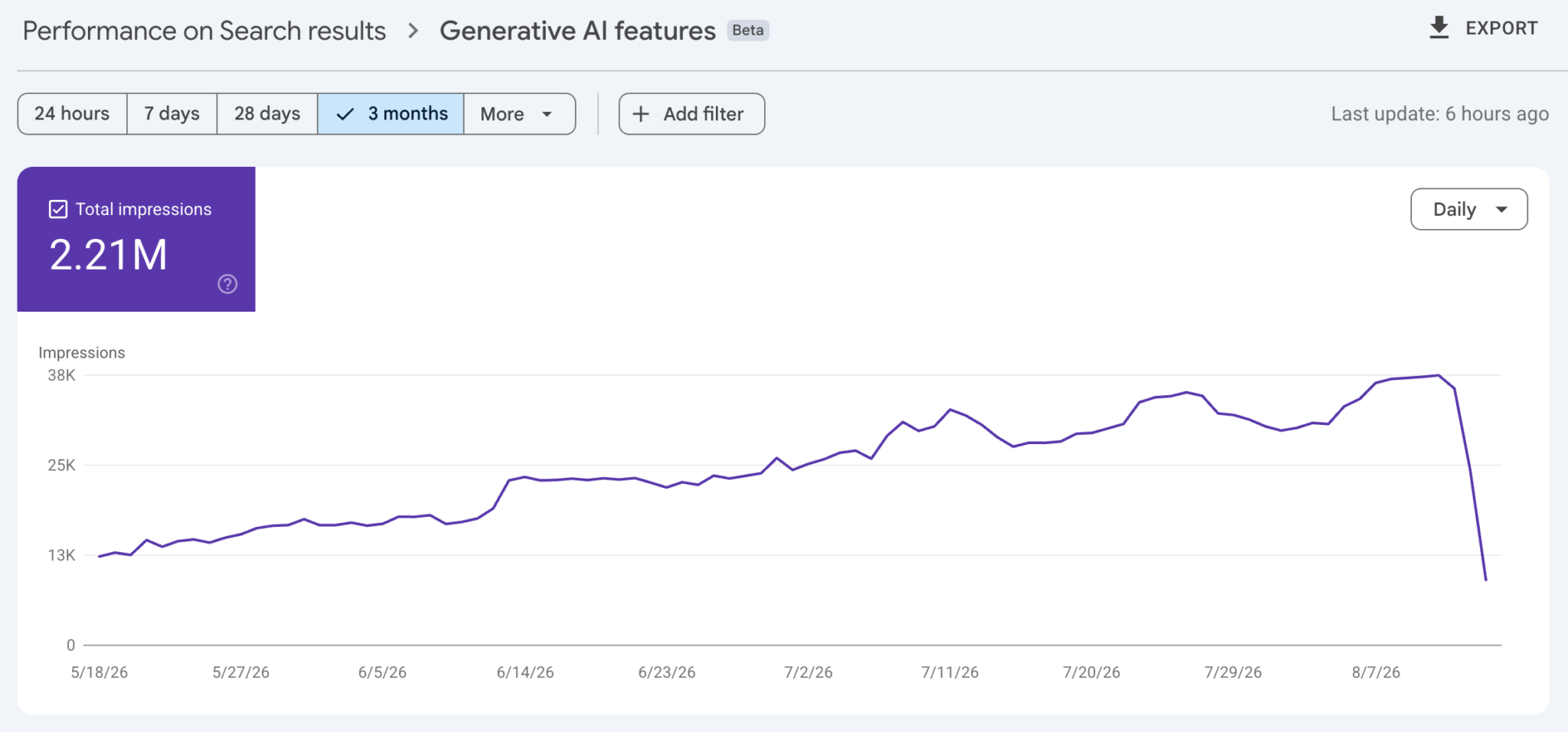
Google has confirmed reports of a bug in Search Console performance reports, specifically the Generative AI in Search performance report. A data logging issue has caused a decrease in the impressions shown. This is a reporting issue, not a true issue in Google Search.
What happened
Looking at the Generative AI report for Search inside Search Console's performance report, you may see a sharp dip in impressions starting on August 13.
Google wrote on its data anomalies page:
August 13 (Generative AI in Search)
A logging error caused a decrease in impressions on the Generative AI performance report in Search for data starting on August 13, 2026. This issue affects data logging only and is ongoing.
Google's John Mueller added on Bluesky:
We're aware of this issue and working on resolving it. This is just a logging issue and not representative of visibility changes in Search. We're adding an annotation in Search Console to let folks know about this in the near future.
Why the confirmation matters
If you noticed the dip, you're not alone. It is widespread, Google has confirmed it, and a fix is in progress.
The practical value is in preventing the wrong response. When an AI search visibility metric drops suddenly, the instinct is to suspect content or technical problems and open a diagnosis. When the cause is a reporting bug, that diagnosis wastes time and can lead to unnecessary edits to pages that were fine.
What this means for marketers
Three working principles come out of this.
First, check the data anomalies page before diagnosing. Google logs known Search Console issues there. Checking it should come before any content or technical investigation — when Google has already announced the issue, the investigation ends immediately.
Second, never judge on one metric. If Generative AI report impressions fall while other metrics — organic clicks, conversions, actual revenue — hold steady, a reporting problem is the likely explanation. Treat something as a real change only when multiple sources point the same way.
Third, annotate your reports. Anything going to a client or an executive should state that this metric carried a logging error from August 13. It prevents wrong conclusions when someone revisits that window later.
Similar caution applies elsewhere. The platform properties covered in Search Console Now Shows the Search Demand Behind Your Social Content also vary in coverage while the rollout matures, so early figures shouldn't be treated as definitive. Most AI search metrics are not yet mature.
Meanwhile AI search itself keeps moving. When models and features change — as with Gemini 3.7 Flash landing in Google Search AI Mode — exposure patterns change with them. In that environment the principle from Most AI Visibility Gains Are Just Technical Debt Repayment holds: rather than reacting to weekly metric swings, spend the time on foundational work that pays off under any reporting regime.