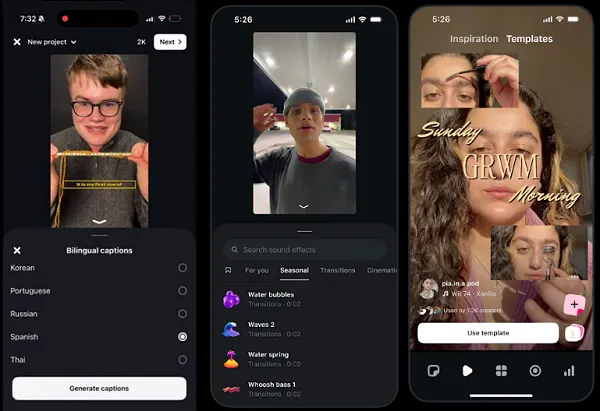
Instagram shared tips on making engaging video content, based on insights from a range of creator consultants. The notes focus on editing and on using Meta's Edits app, laying out a video editing workflow in five steps.
"The creators who consistently make great content aren't doing anything magical," Instagram said. "They've just found a process that works, and they stick with it. Their editing choices are intentional, their workflows are efficient and they're always learning from what the data tells them."
The five steps
1. Start with the hook
Instagram says the first few seconds "decide everything." "The creators we talked to open with the moment that makes someone stop scrolling. A bold statement. A surprising visual. A question that demands an answer. They build the edit around that opening, trimming anything that slows down the start."
Spend a significant share of editing time on that opening, and measure it with the skip rate metric.
2. Edit to the rhythm of the audio
Great editing means cutting on the beat and matching transitions to the energy of the track. "A well-timed cut synced to a beat drop keeps people watching." Use beat markers in Edits to find where beats land, then trim clips to that rhythm. Trending audio can amplify response.
3. Reinforce the message with text and visuals
On-screen text highlights key points and maximizes viewership in sound-off environments, while graphics, stickers or subtle effects add emphasis at the right moments without clutter. "The goal is clarity: every visual element should help the viewer understand and stay with the content."
4. Close the feedback loop with data
"If viewers are dropping off at the 4-second mark, the hook needs work. If saves are high but shares are low, the content might be valuable but not shareable enough." Each video becomes an input to the next edit.
5. Keep the workflow tight
Edits can surface trends and cut manual research. "Browse the Inspiration tab for trending formats, use templates to jump-start creation, post directly from the app and check Insights to see what's working."
What is actually useful here
The valuable part is the diagnostic mapping. Skip rate points at the hook; a 4-second drop-off points at the opening edit; high saves with low shares points at the content's nature rather than its execution. That splits the usual vague brand-account complaint — "views are down" — into three separately fixable problems.
For building presence on other platforms, see Five Steps for Brand Presence on Threads and Four Steps for Snapchat Marketing: Researching a Platform With No Public Trends Tool.