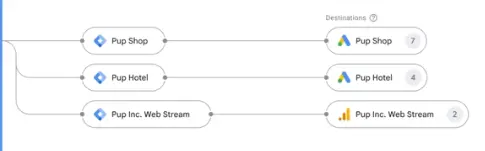
Google overhauled its tagging tools on August 20, pulling Google tag and Google Tag Manager together while adding no-code event tracking, faster data transmission and a simplified Tag Manager interface. The goal is to make measurement setup less technically demanding.
Google tags become full Tag Manager containers
Google tags will be upgraded into fully capable Google Tag Manager containers. Sites currently running only a Google tag gain access to interface-driven tagging, debugging and version control.
Google says the upgrade will not change how existing Google tags behave on webpages. Each Google destination retains its own tag, preserving existing setups and automation event triggers.
Visual tagging: events without writing code
The most consequential addition is visual tagging. Advertisers navigate their own website, select elements directly to define events, and Google handles the technical components — selectors, triggers — behind the scenes.
Google Ads Liaison Ginny Marvin described it as walking through an action such as a purchase the same way a customer would, while Google handles the setup.
Who gains, and who should slow down
Conversion tracking is one of the most technically challenging parts of campaign measurement, especially for smaller advertisers without dedicated analytics or development resources. Visual tagging lowers that barrier considerably.
Organizations with sophisticated Tag Manager implementations need the opposite instinct. Review Google's proposed optimization changes carefully before publishing them, rather than assuming a simpler configuration behaves identically to the one you built.
A cleaner interface and faster data paths
Tag Manager's Overview page is being redesigned, with a new Settings section for container-wide settings and technical features — triggers, variables, templates, folders — moving into a collapsible Advanced section. No existing functionality is removed.
Data transmission changes too. Previously Tag Manager could load additional gtag.js when sending data to a Google destination; optimized containers send data directly instead, which Google says reduces measurement latency and can improve site performance. A visual map will also show which Google destinations are receiving measurement data.
Optimization stays opt-in
Existing users see an in-account optimization banner, but Google will not make the changes automatically. Users with edit, approve or publish permissions initiate it and can preview every proposed change before publishing.
New deployment snippets will eventually share one format with no gtag config command; Google recommends configuring initialization through the gtm init trigger, and advertisers preserving legacy setups can have the trigger wait for the config command. Integrations with Akamai, Cloudflare, Duda, Fastly and Webflow round out the release.
The real story: measurement ownership moves back to marketers
The direction is unambiguous — measurement setup is moving out of developer hands and into marketer hands. Read next to the broader shift toward server-side measurement in Microsoft Advertising Publishes Its Conversions API Docs — Server-Side Measurement Goes Mainstream, the picture is of every ad platform pulling measurement infrastructure closer to itself.
One caution deserves emphasis. No-code tagging makes events easy to create, not accurate. An event defined by clicking a button on screen can break silently when that button's markup or class changes. After creating an event, push a real conversion through the flow, confirm the data lands at its destination, and document it alongside your attribution window settings — see Google Analytics Adds Custom Conversion Attribution Windows — 1–90 Days for Clicks, 1–30 for Engaged Views.