AI agents do not admire your hero image or brand colors. They read the accessibility tree — the structured, semantic layer your browser builds from the DOM, the same layer screen readers have used for decades.
OpenAI's Publishers and Developers FAQ confirms that ChatGPT Atlas interprets page structure and interactive elements through ARIA roles and labels, and that making your site more accessible makes it easier for the agent to understand. Microsoft's Playwright MCP, one of the most widely adopted agent-browsing frameworks, is built around accessibility snapshots rather than screenshots for the same reason.
Read this warning first
Before touching a single ARIA attribute for SEO reasons, remember what this layer is for. The accessibility tree exists so people with disabilities can use the web. Everything in the W3C's Web Content Accessibility Guidelines, including the WCAG 3.0 draft restructuring conformance around outcomes, was written for people using assistive technology.
The stakes of getting it wrong are higher than a lost citation. Sloppy ARIA does not merely confuse an agent — it actively misleads a screen reader user who has no way to know they are being misled. It can also get you sued: some law firms run automated accessibility audits at scale to identify lawsuit targets, and more than 8,600 accessibility lawsuits were filed in 2025 alone. If your site serves a large audience or operates in a regulated industry, bring in a certified accessibility specialist. Treat SEO benefits as a side effect of doing accessibility correctly, never the other way around.
Two ways to see the tree
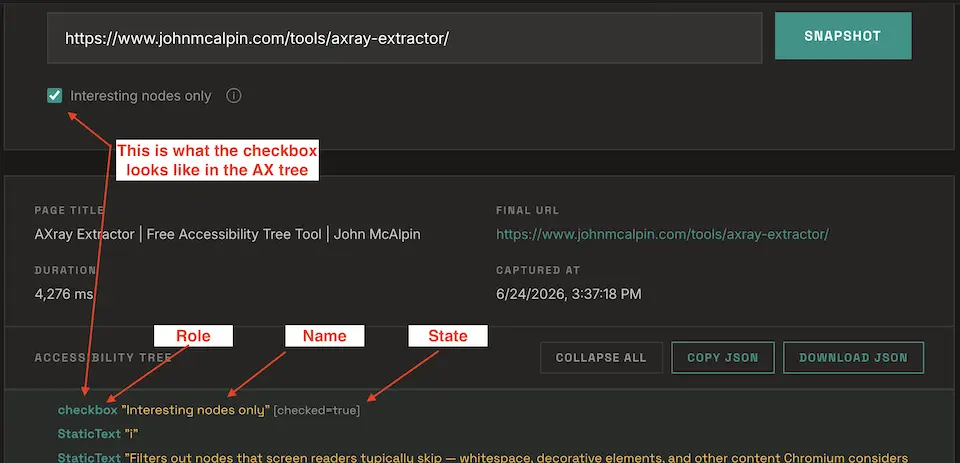
Chrome DevTools has a full-page accessibility tree view: open DevTools, go to the Elements panel, open the Accessibility pane in the sidebar, and enable Full-page accessibility tree. The DOM view switches to the accessibility tree, where you can inspect each node's role, name and state. Tools that capture the tree via a headless browser and export JSON make comparing or sharing multiple URLs faster.
The audit workflows
1. Agent readiness audit on money pages
Pull your top 10–20 pages by revenue or conversions, capture the tree for each, and score them:
- Primary CTA exposed as a button or link with a descriptive name
- Every form input has a programmatically associated label
- Navigation wrapped in a navigation landmark
- Main content wrapped in a main landmark
- Key content — pricing, product details, contact info — present in the tree as readable text
What good looks like: every interactive element has a role that is not generic and a name a stranger could act on without seeing the screen. Unnamed or generic nodes almost always trace back to div-based controls, icon-only buttons without labels, or inputs missing labels. Fix with native HTML first and reach for ARIA only when native elements cannot do the job.
2. Diagnose JavaScript rendering gaps
The old question was "did the content render?" The new one is "did the content reach the layer agents actually read, and when?" Core content, headings and primary links should exist in both pre- and post-JavaScript captures. Run this on a typical client-side rendered ecommerce category page and the usual finding is that the product grid, the filters and sometimes the H1 live exclusively in the post-hydration tree. Server-side render or pre-render anything that fits that description.
3. Audit conversion paths for agent transactions
Agents are moving from reading websites to transacting on them. WebMCP — the W3C draft co-authored by Google and Microsoft engineers, now in a Chrome origin trial — lets a website expose its functions directly to agents. Most sites will not have WebMCP tooling for a while, which leaves time to prepare.
Pick one revenue flow — checkout, lead form, signup — and walk it step by step in the tree, flagging four failure types: unnamed buttons, div-based click handlers, unlabeled inputs, and state that never updates. That last one matters most: an aria-expanded="false" that stays false while the panel visibly opens is worse than no attribute at all, because it confidently lies.
4. Benchmark competitors' machine legibility
If agents mediate a growing share of discovery and purchase decisions, machine legibility is a competitive metric rather than a compliance one — and unlike backlinks, competitors' accessibility trees are public. Capture your most important template and the equivalent URL on three to five competitors. In Playwright, await page.ariaSnapshot() returns a YAML representation of the entire tree in one line.
And the rest
The same layer supports validating heading and landmark hierarchy, fixing anchor text through accessible names, auditing images and alt text for AI extraction, running ARIA snapshots in CI as regression tests, diffing trees before and after migrations, and prioritizing accessibility fixes by SEO value.
Why now
SEOs are suddenly discussing the accessibility tree in 2026 for one reason: AI agents read that exact layer, and WebMCP is on track to let them act on websites rather than just read them. Just keep the order straight — do accessibility properly and machine legibility follows.
For how AI connects concepts to sources, see Entity SEO: AI Search Looks for the Source of a Concept, Not a Keyword; for how one query expands into many, see Query Fan-Out Is Rewriting Google SEO.