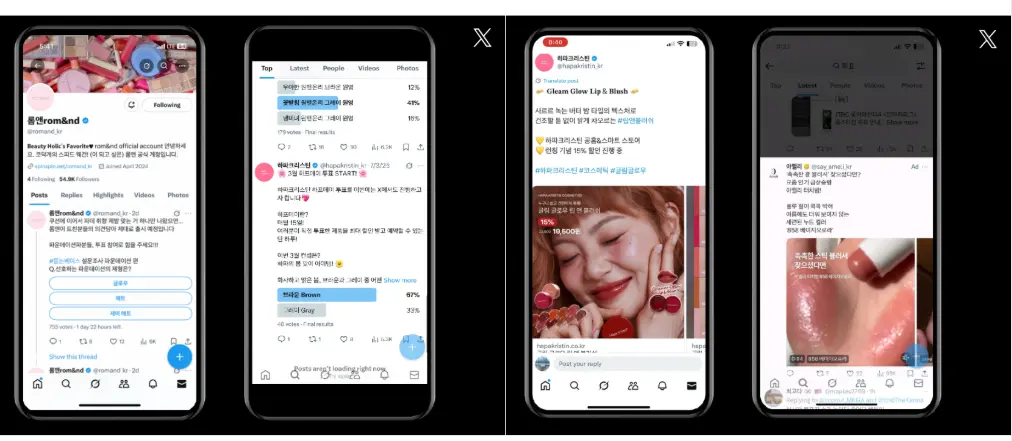
X is less a place to post and read than a community platform where issues spread fastest and interest groups gather to talk. Where Instagram leans on images and lifestyle, X leans on real-time conversation. That is why the point of X advertising is not simple exposure but how a brand can enter a conversation as it forms.
How X users differ
X users do not just consume a feed; they repost, comment and quote. Communities form around entertainment, sports, gaming, tech, finance and B2B topics, and within a fandom or industry group a single keyword or campaign line can quickly become a talking point. The distance between brand and user is short, so awkward or out-of-context messages draw fast reactions. X ads work best when designed around a conversation that is already under way.
The ad product lineup
Products fall into fixed-day exclusive takeovers, bidded promoted posts and branding features. The Timeline Takeover appears at the top of the timeline when the app opens, and the Spotlight Takeover places a keyword and media at the top of the "For You" and live-trends search tabs. The Vertical Video Takeover uses the first ad slot in the vertical video tab. Promoted posts support text, image and video plus website and app cards, carousels, poll cards and conversation cards. Hashmojis add a custom emoji after a keyword, and Hashfetti makes emoji burst across the screen when someone joins a post with a set keyword.
What changes in 2026
Takeover packages now combine with digital out-of-home. Website-conversion campaigns must use a dedicated website card, and hashtags and some emoji in ad copy are restricted. Spotlight Takeover moved from trending hashtags to trending keywords that can include spaces, and a paid-partnership label was introduced for commercial organic content. The new X Ads Manager adds AI-based optimization, reuse of creative proven on other channels, aspect-ratio adjustment, and targeting by interest, keyword, custom audiences and AI-expanded lookalikes.
Before you launch
New advertisers need to apply, submit a business registration, create an ad account, set permissions and update the profile; conversion campaigns also need the X Pixel or an SDK or MMP integration. Going live requires a verification badge showing the official profile, and changing the profile image mid-campaign can affect verification and delivery. Landing pages must match the actual offer, and URL, hashtag and emoji limits should be built into creative production from the start.
What this means for marketers
X suits campaigns where instant reaction matters: product launches, pop-up stores, content drops and sports, entertainment or gaming updates. As targeting and automation get stronger, advertisers must first define which conversation to join and which action to drive. To compare efficiency on another social ad platform, see Facebook Ad Benchmarks 2026: Traffic CPC Falls 14% as CTR Rises 13%. For help choosing ad channels, see our services.