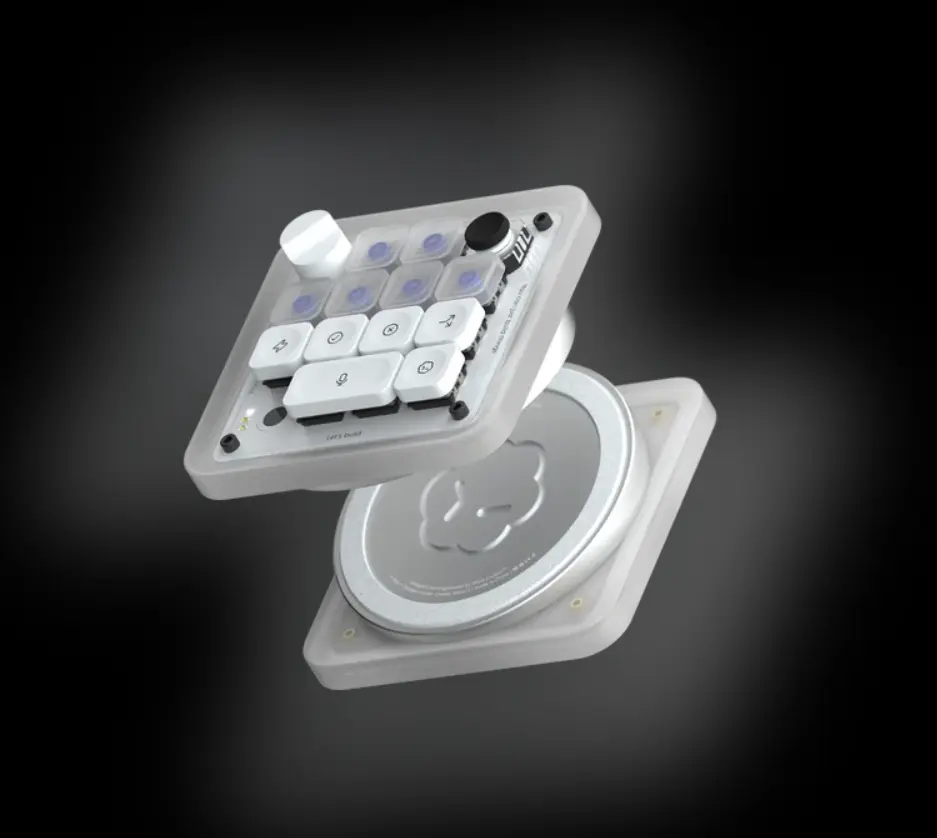
OpenAI, which opened the generative AI era, has stepped beyond the software screen into the physical world — and its first in-house hardware is a keyboard-shaped device.
Choosing the keyboard, the basic computer input device, rather than a mass-market product like a smartphone or smart glasses, is telling.
This isn't a declaration of entry into the computer peripherals market. It's a statement of intent to redefine typing — the most fundamental way humans communicate with AI — as an AI-centred interface.
OpenAI focused on the limitation of users being trapped inside an on-screen prompt window, and produced a physical tool you press and turn with your hands to break out of it.
Codex Micro: closer to an AI macro pad than a keyboard
The device is called Codex Micro, and it looks nothing like a full-size keyboard.
It isn't for entering text. It's much closer to a shortcut keypad — a macro pad — that helps you quickly execute specific functions.
Inheriting the name of OpenAI's earlier AI coding assistant model Codex, it was designed from the outset for organic collaboration with AI. The complex keyboard layout is stripped away, leaving only what's needed to control an AI agent — a compact unit that sits beside your main keyboard as a secondary device.
Thirteen mechanical switches and a joystick
The front holds 13 mechanical switches and one small joystick.
The core idea is converting the AI-related commands developers and designers repeat constantly into a single physical button.
Previously, having AI review code or fix errors meant copying the screen, pasting, and typing a prompt.
With Codex Micro, each switch can be pre-assigned a complex prompt command:
- Code refactoring
- Unit test generation
- Adding comments
The mini joystick moves rapidly between lines of code or navigates intuitively among the options AI proposes. The distinctive feel of a mechanical switch delivers physical feedback that a virtual command actually executed.
A rotary dial for AI reasoning intensity
The most original control is the analogue rotary dial on top.
Turned like a volume knob, it controls the AI's "reasoning intensity" or "creativity parameter" in real time.
Depending on settings, a model can return fast, light answers or perform deep, precise reasoning that takes longer.
- Turn right to extend the AI's thinking time when deeper logical analysis is needed
- Turn left for a lighter mode when quick, simple fragments of ideas will do
Unlike adjusting a numeric value with a slider or mouse click, this offers a new sensory experience: controlling the depth of AI thought through finger pressure and rotation.
Agent status shown in light
A built-in LED interface lets you see the AI's current state without looking at the monitor.
| State | Indicator |
|---|
| Running | Softly blinking light — the AI is computing complex backend code |
| Complete | Clear, steady colour — computation finished and reflected on screen |
| Error | Red-toned light — a code error or the agent stuck mid-task |
Users no longer have to stare at the screen until the AI finishes. Even while doing something else, the pad's light in peripheral vision conveys progress.
What a $230 limited edition means
Codex Micro is not a commercial product built for mass production. It is a $230 limited-edition project made in small quantities in collaboration with custom hardware brand Work Louder.
$230 is high for a simple mini pad, but given high-quality mechanical components and limited-edition value, it reads as an experimental device.
OpenAI released it to collect feedback from frontline professional developers and power users rather than for sales revenue — a living laboratory for finding out how people actually raise productivity when hardware meets AI, and which physical layout suits AI control best.
Challenging GitHub Copilot and Cursor
In software, OpenAI is competing fiercely with GitHub Copilot and the recently surging AI code editor Cursor, both of which have captured developers with complete in-software coding assistance.
Bringing out physical hardware is a strategic move to shake up that software competition.
Software inside a monitor can be replaced by another program at any time, but hardware physically present on a desk becomes a powerful weapon for locking in occupancy of the user's workspace.
By extending its coding agent ecosystem onto the user's actual desk, OpenAI aims to build a hardware-based user experience competitors cannot easily invade.
All the way to Jony Ive — why hardware?
OpenAI's hardware ambition doesn't stop at this small pad. It makes no secret of developing an entirely new class of next-generation AI hardware with legendary Apple designer Jony Ive.
Just as the smartphone opened the app era, an era centred on AI agents needs a fitting new form factor. Existing smartphones and PCs follow interface conventions created before AI existed.
By directly controlling the dedicated hardware body that lets AI's capability be fully expressed, OpenAI wants the integrated hardware-software power that Apple or Microsoft hold.
The AI interface after the keyboard
The future Codex Micro suggests is human-AI collaboration evolving away from text-based conversation into something far more organic and intuitive.
In future work environments, humans will no longer type prompts dozens of lines long. The dominant mode will be summoning swarms of AI agents with one finger, turning a dial to control their depth of thought, and sensing agent status in real time through light and vibration.
What marketers should take from this
Note the "interface equals occupancy" logic. Physical presence on a desk is harder to replace than software — the strategic core of this experiment, and the same logic applies to designing brand touchpoints.
Note that the limited edition is designed as research, not sales. The purpose of 230-dollar small-batch production is power-user feedback, not revenue — a product launch used as a data collection instrument.
Consider "dial-adjustable thinking depth" as a UX question. When reasoning intensity becomes a parameter the user controls, how AI products are explained and priced changes too.
Borrow the idea of moving status out of the screen. LEDs signalling running, complete and error answer the waiting-experience problem when agents run long tasks — on why pilots stall, see Four Myths About AI Agents.
Apply prompt-as-asset thinking to your own work. Assigning a prompt to a switch means refusing to re-explain every time — the same concern as Marketers Who Re-Explain Their Brand Every Time vs Those Who Don't.
Read it as one piece of AI moving into physical space — see AI Steps Off the Screen.
Adapted from a piece by Yoo Hoon-sik published on Brunch and introduced by Mobiinside.