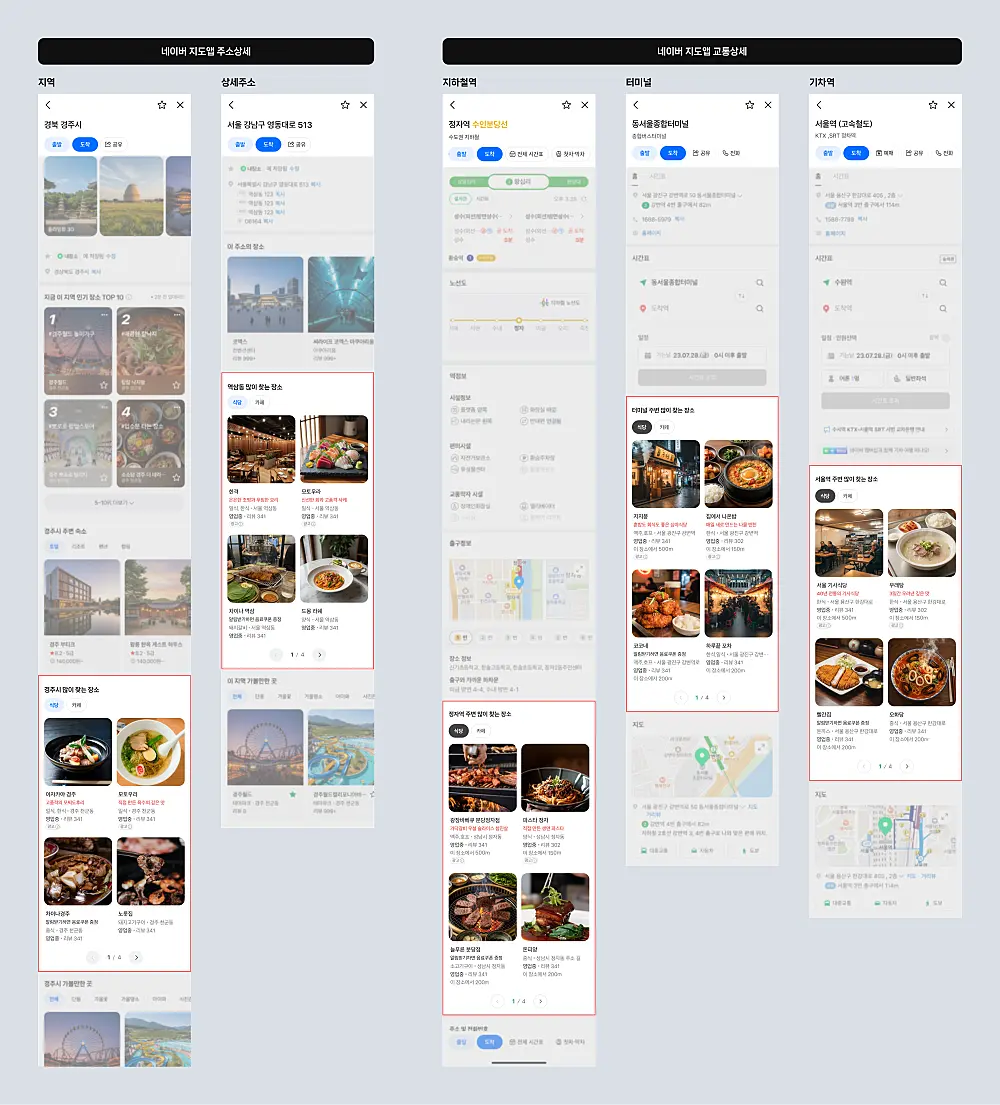
Naver announced that starting Thursday, August 20, 2026, Place Ads will appear in the transit detail and address detail sections of the Naver Maps app.
Placement Conditions
- Eligible ads: Place Ads with the "Recommendations and Content" placement set to ON
- Category: restaurants first, expanding in phases
- Position: below the "Frequently Visited Nearby" module in the Maps app
- Volume: up to 2 per screen, maximum 6 within the section
- Creative: a maximum of 1 image is displayed
Naver noted that the schedule and impression volume are subject to change.
Operations and Billing Are Unchanged
Everything works as it does for existing Place Ads. This is not a new ad product — it is new inventory for an existing one. Qualifying ads will serve automatically with no additional setup.
Two Controls Advertisers Have
If you do not want the placement:
- Set the "Recommendations and Content" placement to OFF at the ad group level
- Enter a dedicated bid for the "Recommendations and Content" placement
The second matters more operationally. Running one bid across placements with different intent characteristics blurs efficiency. A separate bid gives you a basis to compare performance by surface.
What Kind of Intent This Is
Transit detail and address detail are screens a user sees after the destination is already decided — checking a route or looking up an address. The "Frequently Visited Nearby" module sits there, with ads below it.
Intent strength is weaker than a search result, but location context is very strong: the user is moving toward or examining a specific area. Opening with restaurants fits that context, since deciding where to eat en route genuinely happens at this moment.
Practical Checklist
- Baseline impressions and CPC around August 20. New inventory raises volume and moves average cost. Capture the before-state so comparison is possible.
- Design for a single image. This surface shows one creative. Carousel-dependent asset plans do not translate here.
- Start the dedicated bid low. Conversion quality on new inventory is unknown until data accumulates.
For changes in Naver's ad measurement surface, see Naver Display Ads Adds a Reach Report; for local demand flowing into store operations, see Karrot Links Up With Toss Place POS.