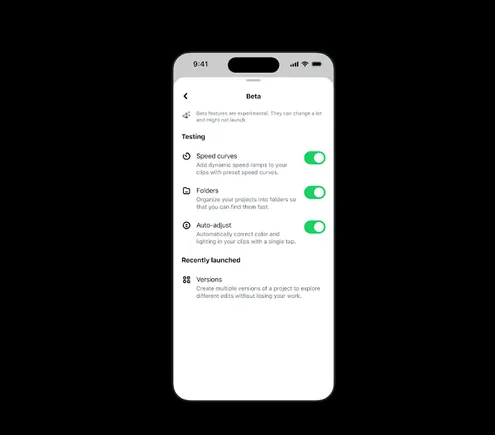
Meta is giving creators access to new experimental video editing features through the beta tab in its Edits app. Speed ramping, color-correction adjustment, and a new way to manage ongoing projects headline the update.
What the beta tab is
Launched in June, the beta tab is a dedicated section inside Edits where upcoming features are available for early testing. Meta's description:
"The Beta tab is a dedicated section in Edits where upcoming features are available for early testing. Features are off by default; creators can choose to toggle them on, try them out, and shake their phone to send feedback. It's how we build Edits alongside creators, giving them agency to shape the app into what will work best for them."
What is new
Speed curves (iOS). Enables "precise, dynamic speed ramping along a customizable curve." Meta says this has been one of its most requested video editing features, especially among short-form creators.
One-tap color correction (iOS). Automatically optimizes exposure, contrast, and tone across a video project.
Folders (iOS and Android). Another way to manage multiple projects at once by saving drafts into separate areas. Per Meta: "Long-press to enter Organize mode and drag-and-drop your drafts into folders, making Edits feel like your own creative studio."
Adjustable layers (Android). Helps creators maintain uniformity of presentation throughout a project. The tools arrived on iOS in November.
Why it is worth watching
The feature list matters less than the development model. Features ship off by default and feedback arrives through a shake gesture — positioning creators as co-developers rather than testers.
Competition in short-form editing is less about individual features than workflow lock-in. Capabilities where work accumulates — project folders, adjustment layers — keep creators inside the app. If TikTok extending AI video ads to 30 seconds is lock-in on the ad production side, Edits targets lock-in on the creative production side.
For brands scaling in-house short-form output, the practical implication is simple: choosing an editing tool is choosing where your creative assets accumulate.
Bottom line
Meta is productizing the co-development process rather than just shipping features. In this phase, the feedback loop itself is the advantage.