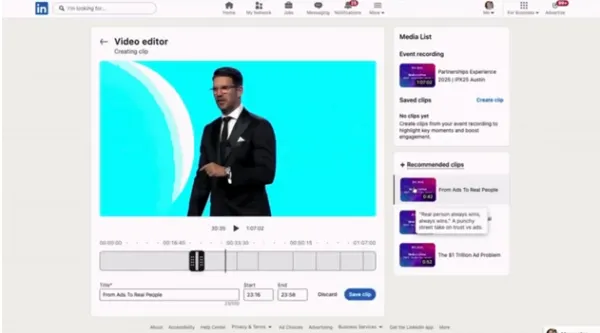
LinkedIn wants creators and brands to extract more value from live event streams, and has introduced AI-powered recommended clips and chapters for live event video recordings that automatically highlight the best parts for reuse.
How It Works
A recommended clips composer is added to LinkedIn's event management tools, offering a separate section of highlights chosen by LinkedIn's system. The event host selects highlighted clips from a right-side mini window and can extend or shorten each segment as they see fit.
In LinkedIn's words:
"Find highlights almost instantly with AI recommendations that identify standout moments, including major announcements, key insights, and memorable quotes."
The process also generates chapters within longer recordings, making replay videos easier to skim for the most relevant segments.
LinkedIn says the feature helps marketers "quickly turn event recordings into short-form highlights that can extend engagement long after the event ends."
Why Now
LinkedIn's own usage data explains the timing:
- A 24% increase in events shared in the app in Q1 2025
- Earlier this month, a reported 10% rise in overall content consumption, with a significant rise in interest in short-form video specifically
Live events are growing and short-form consumption is growing, while the editing work connecting them stayed manual. This feature fills exactly that gap.
Recommended clips and chapters are now available to all users globally.
How Marketers Should Use It
Recalculate webinar ROI. Divide a webinar's cost by live attendees alone and it usually looks expensive. If the recording yields eight to ten short-form clips, the math changes. Where editing resource was the bottleneck, this removes part of it.
Design clippable moments during event planning. The AI looks for major announcements, key insights, and memorable quotes. So deliberately placing clear one-sentence conclusions in the run of show improves extraction — planning with the clip in mind.
Plan personal-account distribution alongside company pages. Reach and citation on LinkedIn already skew toward individual profiles. Given that 75% of LinkedIn's AI citations come from people rather than company pages, clips should be distributed from speakers' personal accounts, not only the company page.
Adjust audience size when reusing clips as ad creative. Highlight clips are narrow, specific assets. Setting them up in line with why LinkedIn recommends 50K–500K audiences is the efficient approach.
Bottom Line
The persistent problem with live events is that they happen once. LinkedIn now slices the recording into redistributable assets automatically. If editing overhead was the reason you scaled back webinars, that constraint just got smaller.