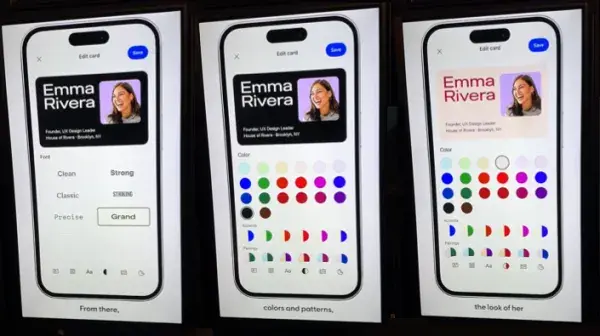
LinkedIn is introducing digital business cards. Members can customize a card with a headshot, role and QR code and add it to their phone’s digital wallet. The feature will roll out globally over the coming months.
What’s included
- A customizable card with headshot, role and QR code
- Digital wallet support, so the card can be shown without opening the app
- QR linking that takes the other person straight to your LinkedIn profile
The feature was shown at LinkedIn’s “Connection by Design” event and surfaced in posts by Jason Feifer and Ishan Sharma.
How it differs from 2018
LinkedIn tried profile QR codes back in 2018, and they never caught on. This time the QR code is wrapped in a familiar business-card format and lives in the digital wallet, cutting the friction of pulling it up. The goal is to turn in-person first meetings — events, conferences, meetings — into profile connections on the spot.
Takeaways
- Your profile is what people see after the card. Make sure your headline, about section and recent posts are in order — first impressions increasingly happen on your channel, as covered in Your Channel Gets Searched Before Your Resume.
- Use it for B2B events. Standardize sales team cards for booths and seminars so you can count post-event connections.
- LinkedIn keeps building for professionals and creators. See LinkedIn Creator Monetization Expands.