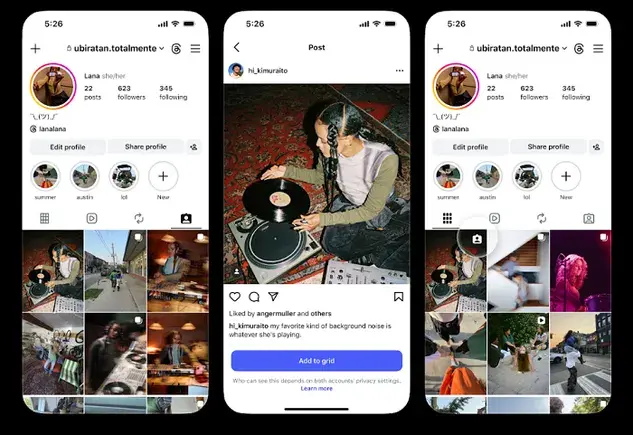
A new ‘Add to grid’ option
Instagram now lets users add posts they’re tagged in to their main profile grid. When viewing a tagged post, the tagged person sees an “Add to grid” option, and the post then appears in their grid with a tag icon in the top-right corner of the thumbnail. It can be done directly from the post in-stream. Tagged posts on the Instagram grid add another way to collaborate and amplify content to followers.
Why Instagram keeps adding collaboration tools
Over the past few years Instagram has added post collaborators, collaborative Stories and remixing of public photos; an AI tool for remixing public posts was added and then quickly removed. The focus is community — protecting Instagram’s identity as a place where people interact, not just consume.
The backdrop is Reels. Previous reports indicate about 50% of time spent on Instagram now goes to Reels, and engagement gains on Facebook and Instagram have been attributed to Reels. If Instagram competes only on video, it faces TikTok, YouTube, Netflix and every other entertainment option. Interaction between users is what sets it apart.
What changes for brands and creators
Customer posts can live on customers’ profiles
When a brand tags customers or creators — in a review spotlight or a giveaway winner post — the tagged person can add it to their own grid. The brand content then keeps appearing to anyone who visits that profile, building social proof outside the brand account.
Creator collaborations reach further
Even collaboration content published only on the brand account can appear on a creator’s grid if they add it. Consider specifying grid placement and duration in collaboration agreements. Given that creator-published Instagram collabs outperform brand-led posts, visibility on a creator’s profile has real value.
The tagged person decides
Adding a post to the grid is the tagged user’s choice, so the content has to be worth adding: posts that flatter the customer, visuals that fit the creator’s aesthetic. The same logic applies when brands repost results from seeding or influencer campaigns — it’s one more outlet for the UGC reuse described in influencer marketing vs. product seeding.