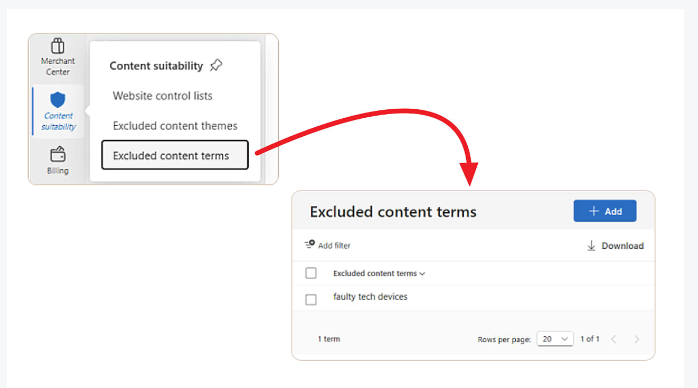
Microsoft Advertising is rolling out Excluded content terms, a new brand safety control that stops Audience Ads from appearing alongside specific page titles. It gives marketers another way to protect brand reputation beyond website exclusions and sensitive content categories.
How it works
Advertisers can create lists of unwanted words or phrases that prevent ads from showing next to page titles containing those terms. Excluded content terms can be added at the account or campaign level, with support for up to 1,000 terms. Account-level exclusions apply automatically across all campaigns, removing the need to recreate lists for future campaigns.
The feature is managed through Tools > Content suitability > Excluded content terms and is rolling out gradually, so not all advertisers have access yet.
How it differs from existing controls
Website exclusion lists block specific domains, and content exclusions filter broad sensitive categories. Excluded content terms offer much more granular control: brands can avoid appearing next to page titles mentioning topics, products or phrases they consider unsuitable, even when the page itself does not fall into a blocked category.
Microsoft continues expanding content suitability controls as advertisers place greater emphasis on brand safety. The feature complements website exclusion lists and IAS-powered content exclusions that already filter ads away from high-risk categories such as adult content, gambling, hate speech and violence.
Putting it to use
Three practical notes.
Excluded terms are most valuable for context that category blocking cannot catch — coverage of a specific incident, lawsuit or recall, competitor brand names, or negative phrasings specific to your category.
The 1,000-term cap argues for a quarterly review rather than endless accumulation. Overly broad generic words will cut reach further than intended.
Because account-level entries inherit automatically, keep brand-wide standards at the account level and campaign-specific conditions at the campaign level.
For why advertiser-side controls matter more as platforms automate moderation, see TikTok Closes Its Nashville Moderation Office — 250 Jobs Cut, 82% of Removals Already Automated.