Meta has shipped a new round of creation features across its Edits app and Instagram Reels. One makes response videos much easier to film; another feature creators have used for just over a year is going away. If you run a brand account, both affect how you plan content.
Three new features in Edits
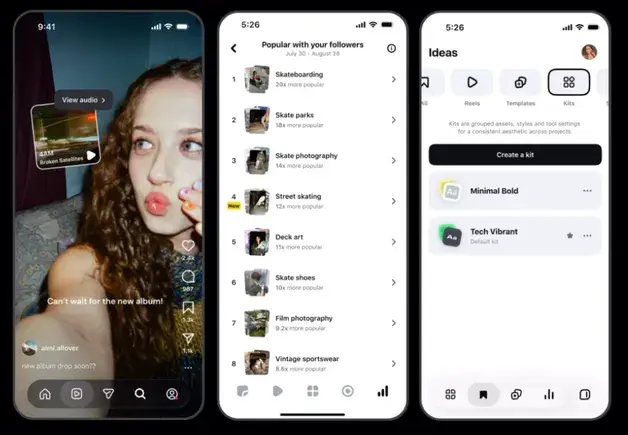
- Audio links: Creators can attach links to specific songs and sounds, which viewers can tap to hear.
- Trending topics: Insight into what’s driving engagement among a creator’s own audience — currently limited to creators with more than 10,000 followers.
- Kits: Save combinations of visual style elements and reapply them whenever you want.
Edits is also getting more visual effects tools.
“Use as reference” in Instagram Reels
In the main Instagram app, creators can now film while watching another Reel:
- Open a Reel shorter than 90 seconds.
- Tap the three-dot menu and select “Use as reference.”
- The Reel opens in a small window in your camera so you can rewatch it while recording.
The window can be moved and paused, and a countdown helps sync with the original. It’s ideal for response videos and for putting your own spin on a trending format. For now it’s iOS only.
Reel linking ends Oct. 28
Instagram is removing the option to link Reels into a series, starting Oct. 28, to simplify the Reels experience. The feature launched in August 2025 to help creators extend engagement across connected clips. Instagram has been exploring long-form options, and this may be a step toward a better system for extended viewing instead of chaining short clips.
Checklist for brand accounts
- If you’ve used Reel linking for series content, move episode navigation into captions, pinned comments or Highlights before Oct. 28.
- Use “Use as reference” to cut production time on trend-response Reels.
- Save your brand’s fonts, colors and effects as a Kit so consistency survives team changes.
Edits has also expanded into photo carousels — see Instagram carousel editing comes to the Edits app.