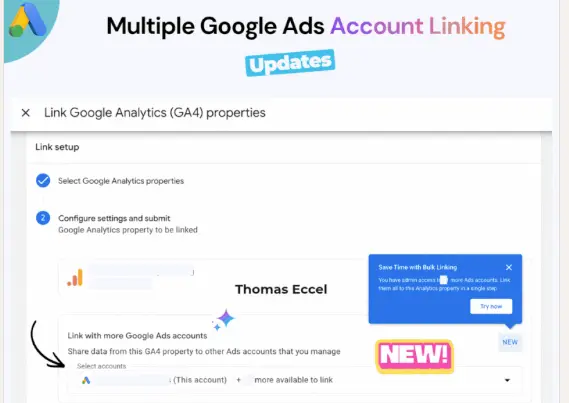
Google Ads has introduced bulk account linking, letting advertisers connect multiple ad accounts to a single Google Analytics 4 (GA4) property in one pass instead of linking each account individually.
Where to Find It
The feature lives under Data Manager > Google Analytics 4 > Link Setup in Google Ads. A dropdown lets you select or deselect several accounts at once, and every account you select shares analytics data with the chosen GA4 property.
Who Benefits Most From Bulk Account Linking
The clearest winners are agencies, franchises, and enterprise teams managing multiple Google Ads accounts. Bulk account linking removes the tedious one-by-one setup and keeps measurement consistent across campaigns — and it lowers the risk of missing conversion data or reporting gaps that tend to appear whenever a client account is added or removed.
The change was first reported by Anu Adegbola at Search Engine Land on July 21, 2026, after paid search specialist Thomas Eccel flagged it on LinkedIn.
What This Means for Marketing Teams
In a multi-account environment, a missing GA4 connection is an easy-to-overlook risk: it degrades conversion tracking and the accuracy of data-driven optimization like Smart Bidding, and it distorts what your reports actually show. Treat bulk account linking as more than a time-saver — use it to standardize your measurement infrastructure.
Agencies should add a "confirm GA4 bulk link" step to every new client onboarding checklist and build a recurring routine to audit connection status. The bigger your account portfolio grows, the more this kind of operational automation determines whether your measurement — and your optimization results — can be trusted.
If your team needs help auditing account structure and tracking setup across multiple clients, Best Partner's services can support that work, or reach out directly.