Anthropic released an official PDF guide titled "The Complete Guide to Building Skills for Claude." Here's a breakdown of what Claude Skills are, how they're used, and what to watch for when building one.
What is a Claude Skill
A skill is a packaged set of instructions and guides that teaches Claude how to handle a specific task. The guide compares MCP to "a kitchen stocked with tools and ingredients" and a skill to "the recipe that makes it valuable." Three design principles anchor the approach: progressive disclosure (separating what's always loaded in Claude's system prompt from instructions loaded only when needed), composability (multiple skills can be loaded together), and portability (skills work across claude.ai, Claude Code, and the API).
What planning a skill requires
Before writing any code, you should define 2-3 concrete use cases. The guide identifies three common categories: document and asset generation (consistent docs, presentations), workflow automation (orchestrating a multi-step process), and MCP enhancement (improving access to tools). Success is measured quantitatively — a 90% skill-trigger rate, zero API failures — and qualitatively, by reduced need for extra prompting and consistency of output.
Building, testing, and shipping
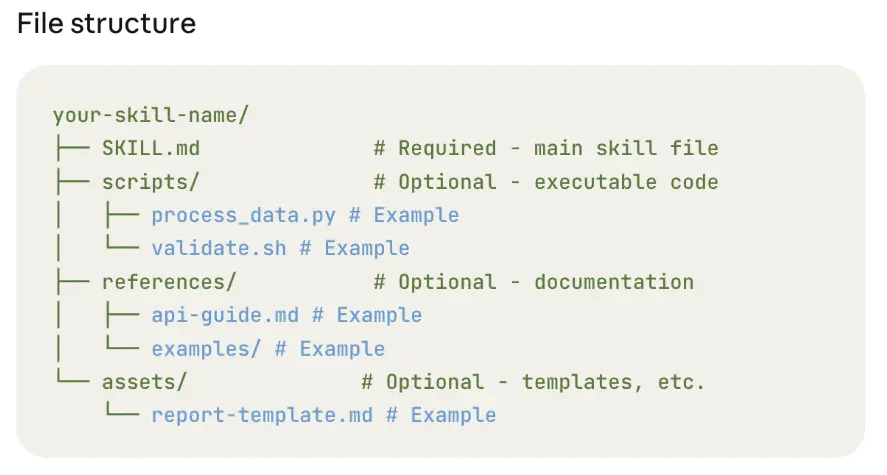
Technically, the main file must be named SKILL.md, folder names must be lowercase kebab-case, and the YAML frontmatter's description field cannot use angle brackets (< >). Testing happens across three modes: manual (running it directly in Claude.ai), scripted (automated via Claude Code), and programmatic (via the Skills API). If a skill under-triggers, add keywords and phrasing to the description; if it over-triggers, add negative triggers and narrow the scope. Distribution for individuals is a zip upload; organizations can deploy across a whole workspace; and via the API, skills are invoked through the /v1/skills endpoint and the container.skills parameter.
What marketing and ops teams can take from this
Packaging recurring marketing workflows — rewriting SEO content, building campaign reports, reviewing ad creative — as skills lets an entire team apply AI with the same process and quality bar, which is a genuinely practical win. The guide's "multi-MCP orchestration" pattern (chaining services like Figma → Drive → Linear → Slack) maps directly onto automating a marketing operation that spans content creation through approval and publishing.
The real-world friction of rolling out AI tools inside an organization is worth reading about too. If you're evaluating how to introduce AI workflow automation, explore Best Partner's services or get in touch.